
Archivist AI Rebuilds Its Interface and Gives Every Session Its Own Award Show
Hero Awards, Key Moments, and a redesigned Session Handout land in a single Artifacts library, alongside a sitewide

Press Release Disclaimer: This is a press release distributed through the XPR Media network. It has not been independently verified by our newsroom.
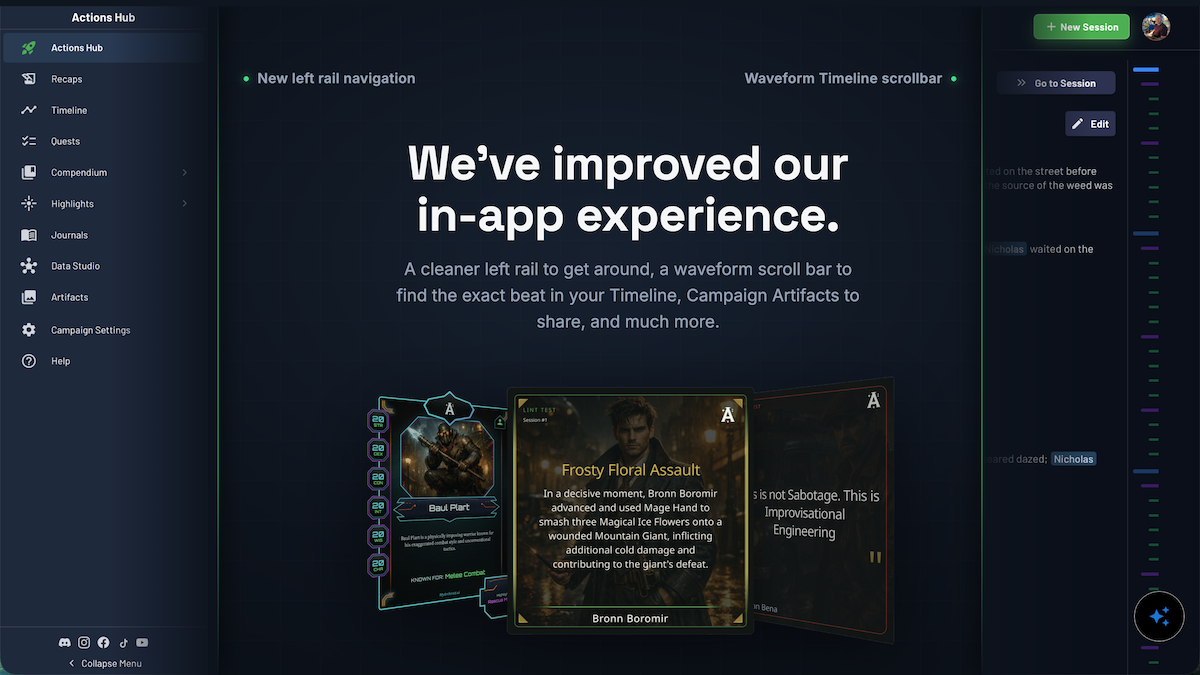

Hero Awards, Key Moments, and a redesigned Session Handout land in a single Artifacts library, alongside a sitewide interface overhaul and faster Session Review
SAN LUIS OBISPO, NC, UNITED STATES, July 30, 2026 /EINPresswire.com/ — Archivist AI, the campaign memory platform built for tabletop roleplaying game groups, today launched its biggest post-session update yet: Hero Awards, Key Moments with optional generated artwork, a rebuilt Session Handout, and a new Artifacts library that gathers all of it in one place. A sitewide interface overhaul and a faster Session Review ship in the same release.
Archivist has spent the last year turning session content (via Discord Live Transcription, Audio or Text upload) into clean written records, and that record does not change here. What is new is what a table gets to do with it afterward: an award for the player who pulled off the impossible plan, an illustrated panel of the moment the reveal landed, a themed handout for the group chat. Most of the underlying work in this release is a rebuild of the interface itself, even though the features are what a group will notice first.
Hero Awards: a moment with your name on it
Every completed session now generates Hero Awards, a set of per-character awards tied to what each player actually did at the table that night. Groups choose the tone before generating: Canonical for a grounded, sincere read on the session, Silly for playful embellishment, or Spicy for a roast-forward edge aimed at the player who rolled three natural ones and then walked into the obvious trap anyway. The tone changes the framing and which moment gets picked – a Spicy award will happily call out a whiffed spell right after a big win – but it does not change what happened. Awards are built to be shared as part of the post-session packet, not buried in a settings menu.
Key Moments, now with optional artwork
Key Moments cover the other half of the story: full-party scenes rather than individual performances – the betrayal, the reveal, the save that should not have worked. When it is used, a group picks from three styles: Canonical for the session’s clearest highlights, Cinematic for heightened, dramatic framing, or Chaotic for the funny, messy chaos that half of every campaign is actually made of. Archivist has offered image generation for characters and other campaign entities since launch; this release extends that same tool to Key Moments. Nothing generates automatically. A group opens a moment and chooses to generate art for it, and the feature can be turned off entirely from campaign settings. Hero Awards and Key Moments together make up what Archivist calls Session Highlights.
“This release rebuilds the Archivist interface across the app with unified navigation, controls, and action buttons, so every major surface is easier to scan and act on,” said Greg Harzelak, Co-founder of Archivist. “The result is a clearer app structure from home across campaign-level views like recaps, game session pages, and character pages, plus feature-specific surfaces like Session Handouts, Cast Analysis, Artifacts, Hero Awards, and more.
Session Handout 2.0
Session Handouts provide a post-session recap highlighting what happened, from encounters to notable items acquired to individual player spotlights. Session Handout 2.0 also includes Quest Logs and Cast Analysis alongside the standard recap, and five new design themes: Parchment, Azurelight, Nightwire, Verdant, and Infernal Ink. Hero Award and Key Moment cards styled to match whichever theme a group picks are part of the new design as well, and a new layout builder lets groups drag sections into place, start from a preset, or take full control of what goes on the page.
Artifacts: one library for everything a campaign produces
Every shareable that a user generates for their campaign (Session Handouts, Hero Awards, Key Moments, Quest Logs, Cast Analysis, Digital Trading Cards, and more) now lives in a single Artifacts library. Groups can organize artifacts into collections however they like, most commonly surfacing them around a session for PCs, then sending a collection out through the same share sheet: Discord, email to the cast, a ZIP download, a public share page, or straight to Facebook, Reddit, X, or Telegram. On mobile, artifacts can go anywhere the device’s native share sheet reaches.
A faster Session Review
Session Review has been rebuilt around a smaller surface: confirm the facts, approve the record, move on. Archie, Archivist’s AI assistant, can now handle name corrections, fact fixes, and other retcons directly within the review flow, cutting down on the back-and-forth that used to slow this step.
A sitewide redesign
The release also rebuilds navigation, controls, and action buttons across the entire app, from the home screen to campaign-level views like recaps, session pages, and character pages, down to feature-specific surfaces including Session Handouts, Cast Analysis, Artifacts, and Hero Awards. The goal was a single, consistent interface.
“Our product roadmap is informed by the feedback we receive directly from our users,” explained Greg Wood, co-founder of Archivist. “We try to implement those improvements and new features as quickly as we can, to ensure the experience of using Archivist is always improving.”
Availability
Hero Awards, Key Moments, Session Handout 2.0, Artifacts, the redesigned Session Review, and the sitewide UX overhaul are available now to all Archivist users. A full walkthrough of Artifacts, collections, and sharing is available in the Archivist Academy, and full release notes are posted at myarchivist.ai/blog.
Rick Liebling
Archivist AI
rickliebling@gmail.com
Visit us on social media:
LinkedIn
Instagram
Facebook
YouTube
TikTok
Other
Legal Disclaimer:
EIN Presswire provides this news content “as is” without warranty of any kind. We do not accept any responsibility or liability
for the accuracy, content, images, videos, licenses, completeness, legality, or reliability of the information contained in this
article. If you have any complaints or copyright issues related to this article, kindly contact the author above.

Media gallery


